
How do I measure for a Custom Rectangular Ottoman Cover?
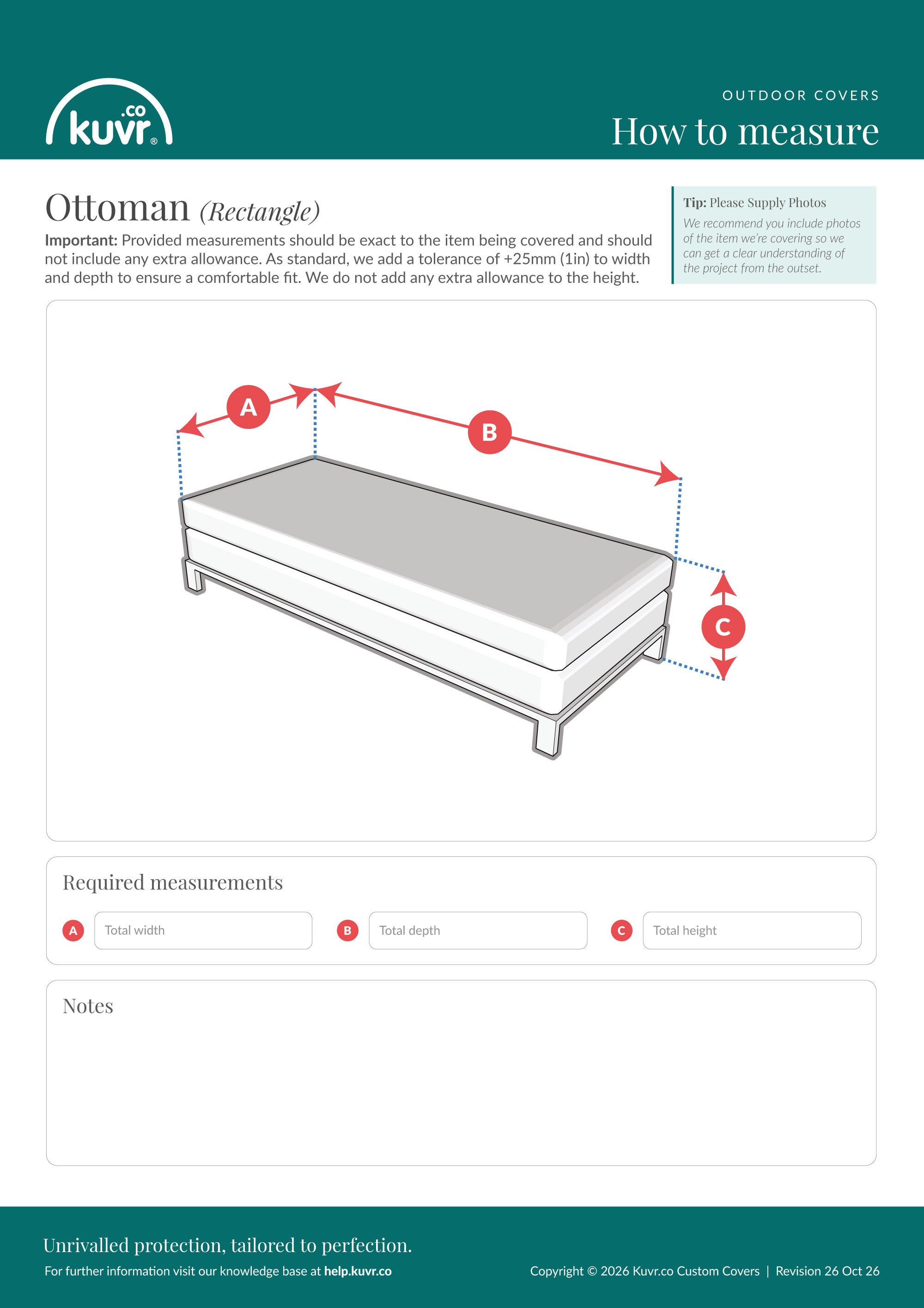
This guide explains how to measure your rectangular ottoman for a custom-fitted Kuvr® Ottoman Cover, including each required measurement, where to take it, and how to record it accurately. There are 3 measurements to take, labelled A to C.
Important
Provide exact measurements with no extra allowance added. Kuvr® adds a standard tolerance of +25 mm (1 in) to the width and depth for a comfortable fit; no allowance is added to the height. You can measure in centimetres, inches, or metres — you choose your preferred unit when you configure the cover.
Please include photos
Photos of your rectangular ottoman, taken from a few angles alongside your measurements, help us understand the exact shape and get your cover right from the outset. Including a tape measure in shot for scale is ideal.
The measurements
A — Total width
This is the total width of the ottoman at its widest. Measure straight across the front from side to side.
B — Total depth
This is the total depth of the ottoman from front to back, at its widest.
C — Total height
This is the vertical height from the floor to the top of the ottoman. Measure vertically from the floor, keeping the tape straight and plumb.
Frequently asked questions
Which ottoman guide should I use?
Pick the guide that matches your ottoman — rectangular, square, or round. Choose the closest shape.
Do I measure with the top cushion in place?
Yes. Measure the ottoman exactly as it will sit when covered, including any fixed or resting top cushion.
Should I measure the ottoman or my old cover?
Measure the ottoman itself, with any existing cover removed. Measuring over an old cover adds thickness and gives an oversized result.
Can I measure in inches?
Yes. Measure in centimetres, inches, or metres — you choose your preferred unit when you configure the cover. Keep the same unit throughout.
Ready to order?
Configure your own cover and get an instant quote on our Custom Ottoman Cover product page.
Downloads
Download the PDF measuring guide
Download the JPG measuring guide